Discord Patched APK: Venus Patches Features, Privacy Tweaks & Custom Themes
Discover Venus Patches 1.16.1 for Discord, featuring custom themes, privacy controls, messaging enhancements, automatic quest completion, and more.

More configurable features and customization options are available through Venus Patches 1.16.1.
Security Disclaimer
DWYOR — Do Your Own Research
Use modified APKs at your own risk. These are unofficial modifications and are not affiliated with or endorsed by Discord. Modified apps may contain malicious code, compromise your account, expose personal information, or introduce security vulnerabilities.
Only download files from sources you trust. Verify the origin of each APK, scan files before installation, and review patch sources whenever possible. Avoid using your primary Discord account with modified clients, and never share your password, authentication codes, or other sensitive information with untrusted apps.
Although Venus Patches includes options to disable certain tracking and reporting features, this does not guarantee complete privacy or security. The integrity and safety of third-party APKs cannot be guaranteed.
Option 1: Download the Pre-Patched APK
Download the patched Discord APK directly without performing the patching process yourself.
Verify the file’s source and scan it before installation.
Option 2: Patch Discord Yourself
Use Morphee Manager with the Venus Patches repository to select and apply the patches you want.
Required Downloads
Morphee Manager
Venus Patches
Patching Steps
- Download and install the latest release of Morphee Manager.
- Add the Venus Patches repository.
- Find Discord in Morphee Manager.
- Select the option to download the APK from APKMirror.
- Choose the patches you want to apply.
- Save the patched APK or install it directly.
What Do Venus Patches Enable?
Venus Patches 1.16.1 adds customization options, privacy controls, messaging improvements, and extra Discord features.
1. Account and Profile Customization
- Account Switcher — Makes it easier to switch between Discord accounts.
- Copy Profile Bios — Lets you copy text from user profile biographies.
- Custom Themes — Enables custom Discord themes, including compatible Revenge themes.
- Pastel Name Colors — Applies pastel-style colors to usernames.
- Unlock App Icons — Makes additional app icons available.
- Use Your Phone’s Emojis — Uses your device’s emoji set instead of Discord’s default emoji appearance.
- Use Your Phone’s Font — Uses your device’s font for a more personalized interface.
- Venus Button on Profile Bar — Adds a shortcut to Venus features in the profile bar.
- Venus Settings — Provides access to Venus-specific configuration options.
2. Privacy and Tracking Controls
- Disable Advertising Identifiers — Disables or limits the app’s use of advertising identifiers.
- Disable Analytics — Disables supported analytics collection.
- Disable Crash Reporting — Disables supported crash-report submissions.
- Disable Install Attribution — Disables supported install-attribution tracking.
- Disable Telemetry and Touch Logging — Disables supported telemetry and touch-event logging.
These patches aim to reduce certain forms of tracking and data reporting. Their effectiveness depends on the implementation and should not be considered a guarantee of complete privacy.
3. Messaging and Conversation Improvements
- Double-Tap to Reply — Lets you reply to a message by double-tapping it.
- Fix Unknown Mentions — Improves the handling or display of mentions that Discord cannot resolve normally.
- Jump to First Message — Provides a shortcut to the beginning of a conversation.
- Keep Deleted Messages — Preserves messages that would otherwise disappear after deletion, where supported.
- Message Highlights — Highlights selected or relevant messages.
- Read All Button — Adds a shortcut to mark messages or conversations as read.
- Send Long Messages — Allows longer messages than the standard client normally permits, subject to implementation limits.
- Skip Delete Confirmation — Removes the confirmation step when deleting messages.
- Translate Messages — Adds message translation functionality.
Note: Retaining deleted messages does not necessarily recover messages deleted before the patch was installed.
4. Media, Attachments, and Emojis
- Favourite Any Image or Video — Lets you favourite images or videos beyond the usual supported options.
- Send Nitro Stickers and Emojis as Links — Allows Nitro stickers and emojis to be shared as links.
- Send Audio as Voice Messages — Lets you send audio files in a voice-message format.
- Show File Sizes When Attaching — Displays file sizes when selecting attachments.
5. Interface and Channel Controls
- Hide the Quests Banner — Removes the Quests banner from the interface.
- Hide the Call Button — Hides the call button.
- Hide the Gift Button — Hides the Nitro gift button.
- Hide Typing Indicator — Hides the typing indicator.
- Show Device Indicators — Displays device-related indicators where supported.
- Show Hidden Channels — Makes hidden-channel information or entries visible where the client permits it. This does not automatically grant permission to read restricted messages.
- Spaces in Channel Names — Allows spaces in channel names where supported by the patch and Discord’s server-side validation.
6. Quests and Notifications
- Complete Quests Automatically — Automates supported Discord Quests completion.
- User Activity Notifications — Adds notifications for supported user-activity events.
- User and Server Reviews — Adds access to user and server review features.
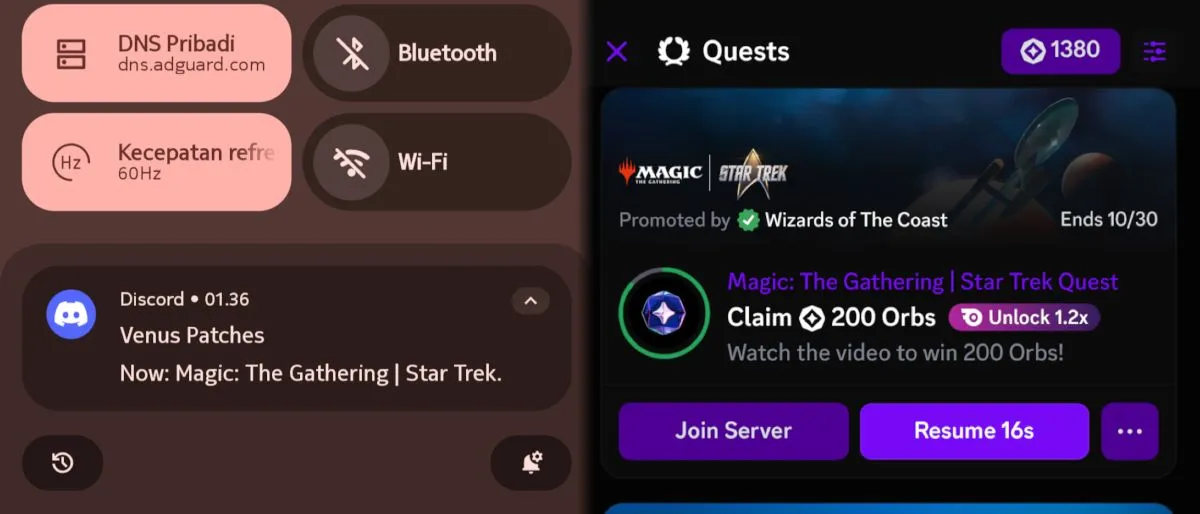
Quest automation may not work for every campaign or activity. Discord may change its requirements, and automated completion can carry account-policy risks.
Custom Discord Themes
- Open Settings > Appearance > Custom and enable the feature.
- Browse Revenge themes and copy the link for your preferred theme.
- Return to Discord, paste the link, and install the theme.
Enable Automatic Quest Completion
- Open Settings > Features > Quests.
- Toggle the feature on.
Final Notes
Venus Patches offers modifications ranging from visual customization and messaging shortcuts to privacy controls and quest automation. Some features may depend on your Discord version, patch implementation, or server-side restrictions.
Review the available patches and enable only the features you need. Modified clients may break after Discord updates and may carry account, privacy, or security risks.